Mastering Dynamic Typography: A Practical Guide to the Gohigher Font
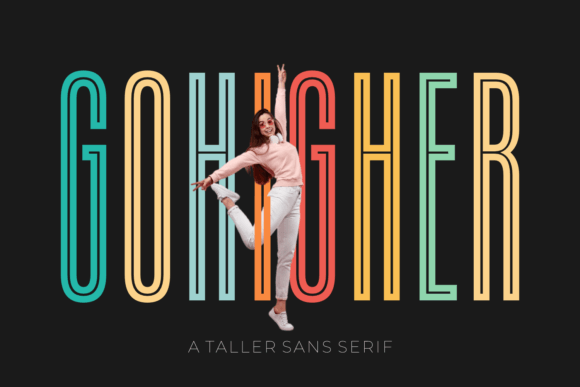
In the crowded landscape of digital typography, finding a font that commands attention without sacrificing legibility is a rare feat. This is precisely where Gohigher enters the conversation. It is not merely another sans serif typeface; it is an ultra-condensed, signature font designed specifically to bridge the gap between aggressive display aesthetics and functional readability. For designers, marketers, and creators looking to inject energy into their projects, Gohigher offers a distinct verticality that draws the eye upward, making it a potent tool for everything from sports jerseys and movie posters to social media headers and apparel labels.
However, the very characteristics that make Gohigher powerful—its ultra-condensed form and bold presence—are also what make it easy to misuse. Many creators download this asset with high hopes, only to end up with layouts that feel cramped, illegible, or visually jarring. To truly harness the potential of this globally accessible asset, which supports over 400 glyphs and a broad range of languages, one must move beyond simple installation and understand the nuance of its application.
The Trap of the "All-Purpose" Mindset
One of the most frequent errors beginners and even seasoned professionals make is treating a display font like Gohigher as a workhorse for all text. It is vital to remember that while Gohigher is exceptionally legible for a condensed font, it is still a display typeface. Its primary DNA is built for impact, not for long-form reading.
A common scenario involves a small business owner designing a product catalog. They fall in love with the look of Gohigher and decide to use it for both the headlines and the product descriptions. The result is a page that feels suffocating. The reader’s eyes fatigue quickly because the brain has to work harder to process dense paragraphs of ultra-condensed text.
The Better Approach: Use Gohigher to create hierarchy. It should be the loudest voice in the room, not the only one. Pair it with a wider, neutral sans serif or a classic serif font for body copy. For instance, on a website header or a movie poster, let Gohigher handle the title to create that dynamic, high-energy vibe. Then, use a font like Roboto or Open Sans for the supporting information. This contrast not only improves readability but also makes the Gohigher headlines pop even more by comparison.
Ignoring Negative Space and Tracking
Because Gohigher features a unique ultra-condensed signature, the default spacing between characters (tracking) often needs adjustment depending on the medium. A misunderstanding many users have is that the font is "plug-and-play" at any size. In reality, condensed typography requires careful management of air.
When using Gohigher for massive headlines on a billboard or a banner, the tightness of the letters can sometimes cause them to visually merge, especially at a distance. Conversely, if you use it for a small label on apparel, the distinct shape of the letters needs to breathe to remain crisp.
The Solution: Do not be afraid to manually adjust the tracking. For large-scale displays, slightly loosening the letter spacing (increasing tracking) can enhance the aesthetic appeal without breaking the condensed structure. For digital applications like social media posts, ensure there is sufficient padding around the text block. Gohigher is designed to accentuate legibility, but that design intent is unlocked only when you give the text room to exist. Treat the font like a sculpture; it needs a pedestal of empty space to be appreciated.
Overlooking the Power of Glyphs
A significant oversight, particularly for global creators and marketers, is ignoring the extensive character set provided. Gohigher boasts an impressive selection of 400 glyphs. This is not just a number; it is a gateway to global communication and stylistic flair. Many users limit themselves to the basic A-Z and 0-9, missing out on the stylistic alternates and multilingual support that make this font a globally accessible asset.
If you are a freelancer working with international clients or an educator creating materials for diverse classrooms, ignoring these glyphs can lead to missing diacritics (accent marks) or stylistic inconsistencies. It can make a brand look amateurish if a French slogan or a Spanish tagline is missing its necessary accents because the user didn't explore the font's full capabilities.
Practical Advice: Before finalizing a design, explore the Glyphs panel in your design software (such as Adobe Illustrator or Photoshop). Look for alternate characters that might offer a different flair for a specific letter. Furthermore, verify that your specific language needs are met. While Gohigher supports a broad range, always test your specific copy to ensure the typography renders correctly. This due diligence ensures your message is communicated with clarity and professionalism, regardless of the language.
Mismatching Tone and Context
Just because a font is versatile doesn't mean it fits every mood. Gohigher carries an inherent energy—it is modern, athletic, and forward-moving. A mistake often seen in branding is applying this font to contexts that require a soft, traditional, or gentle touch.
Imagine a high-end, boutique spa using Gohigher for their wedding invitations, or a heritage law firm using it for their official letterhead. The font, while beautiful, communicates speed and modernity. It might inadvertently send the wrong psychological signal, making the brand feel disjointed from its actual service.
The Corrective Check: Always evaluate the emotional resonance of the typeface. Gohigher is exceptional for sports branding, tech startups, fashion labels, and entertainment. It excels where you need to communicate innovation or excitement. If your project requires a sense of history, softness, or extreme formality, Gohigher might be better suited as an accent element rather than the primary identifier.
Final Evaluation Before You Commit
Before you integrate Gohigher into your next big project, run through a quick mental checklist to ensure you are making a sound design decision:
- Contrast Check: Have I paired Gohigher with a secondary font that offers enough visual contrast to aid readability?
- Spacing Test: At the intended size, are the letters legible, or do they need manual kerning and tracking adjustments?
- Context Match: Does the "vibe" of the font align with the core message of the brand or project?
- Language Support: If the content is multilingual, have I verified that the necessary glyphs are present and rendering correctly?
By avoiding the pitfalls of overuse, neglecting spacing, and ignoring context, you can leverage Gohigher to take your designs to new heights. It is more than just a download; it is a tool for creators who want to make a statement. When used with intention and expertise, Gohigher transforms standard layouts into mesmerizing displays that captivate audiences worldwide.