Harper: The Ultra-Narrow Font That Commands Attention
In a world saturated with visual noise, the tools a designer chooses speak volumes before a single word is read. Typography is not merely about legibility; it is the voice of your content. When you need that voice to be authoritative, sleek, and undeniably modern, the choice of typeface becomes a strategic decision. This is where Harper enters the conversation—not just as a font, but as a distinct architectural element for your designs.
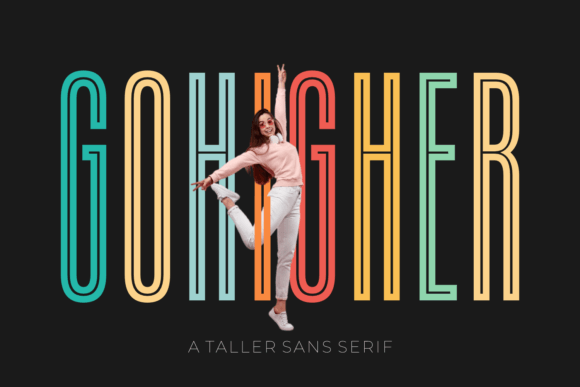
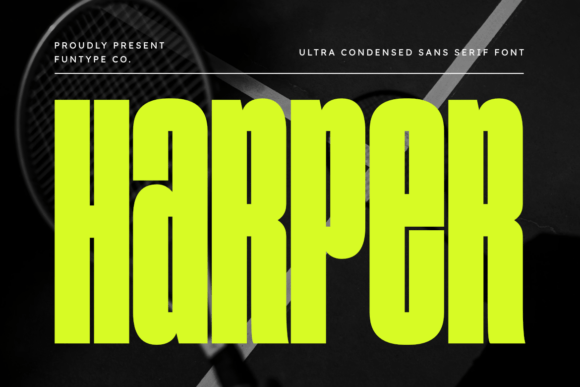
Harper is an ultra-narrow sans serif typeface designed with a singular focus: to maximize impact while minimizing horizontal space. It is a typeface built on the principles of geometry and strength, offering a towering vertical presence that cuts through the clutter. For designers, marketers, and creators who need to make a bold statement without overwhelming a layout, Harper provides a solution that is both practical and visually arresting.
Understanding the Anatomy of Harper
At its core, Harper is defined by its extreme condensation. Unlike standard sans serifs that occupy a comfortable, predictable footprint, Harper is engineered to be tall, thin, and imposing. This creates a unique typographic tension: the letters are slim, yet they carry a heavy visual weight due to their height and the precision of their geometric lines.
This design philosophy makes Harper particularly interesting for modern design trends that favor minimalism and high contrast. It does not whisper; it projects. The font’s structure ensures that even at narrow widths, the characters remain legible and distinct, avoiding the muddiness that sometimes plagues condensed typefaces. It is a clean, functional tool that respects the grid while pushing the boundaries of vertical space.
Strategic Applications for Maximum Impact
The true value of a font like Harper lies in its application. Because of its unique proportions, it is not a "one-size-fits-all" solution for body copy, but rather a specialized instrument for specific creative challenges. Here is how different professionals can leverage Harper’s strengths.
Headlines and Hero Sections
For web designers and bloggers, the "hero" section of a website is prime real estate. You often have a split second to communicate value. Harper excels here. Using Harper for a main headline allows you to use a large font size that commands attention vertically without consuming the entire width of the screen. This leaves valuable negative space for imagery or supporting copy, creating a balanced, airy layout that feels sophisticated rather than cramped.
Editorial Layouts and Magazine Spreads
In print and digital publishing, managing column widths is a constant challenge. A standard bold font might break awkwardly across lines in a narrow column. Harper’s narrow footprint allows editors to fit more characters per line, maintaining the flow of a headline without hyphenation or awkward wrapping. It brings a high-fashion, editorial aesthetic to magazines, lookbooks, and news layouts.
Logo Design and Brand Identity
Branding is about distinctiveness. Many logos rely on standard geometric shapes, which can lead to a homogenous look across an industry. Integrating Harper into a wordmark immediately sets a brand apart. It suggests precision, modernity, and forward-thinking. It is particularly effective for tech startups, architectural firms, and industrial brands that want to convey efficiency and structural integrity.
Practical Design Scenarios
To truly understand how to use Harper effectively, it helps to visualize it in context. The font’s versatility allows it to adapt to various creative goals, provided the designer understands the relationship between width, height, and whitespace.
- Event Posters and Signage: When designing for physical spaces, verticality is an asset. Harper allows for large, readable text on tall banners or narrow posters where space is at a premium. It ensures that event details are visible from a distance, projecting a sense of grandeur and importance.
- Social Media Graphics: Platforms like Instagram and Pinterest favor vertical formats. Harper allows you to stack text creatively, creating dynamic compositions that stand out in a fast-scrolling feed. It turns text into a visual texture that can be used to frame images or create bold typographic backgrounds.
- Corporate Presentations: For pitch decks and corporate reports, Harper offers a way to modernize the aesthetic. Using it for slide titles breaks the monotony of standard presentation templates, signaling to the audience that the content is contemporary and polished.
Pairing Harper with Other Typefaces
One of the most common questions regarding ultra-narrow fonts is how to pair them. Because Harper is so distinct in its proportions, it requires a partner that can provide stability and readability for longer passages.
A practical approach is to contrast Harper’s height with a wider, softer sans serif or a classic serif font. For instance, pairing Harper’s bold, vertical headers with a readable, medium-weight humanist sans serif for body text creates a clear hierarchy. The headers grab attention, while the body copy invites reading. Avoid pairing Harper with other condensed fonts, as this can create visual tension and reduce legibility. Let Harper stand alone as the primary attention-grabber.
Technical Considerations and Formats
Functionality is just as important as aesthetics. Harper is provided in both OTF (OpenType) and TTF (TrueType) formats. This ensures broad compatibility across different operating systems and design software, from Adobe Creative Suite to web platforms.
When using Harper, pay attention to tracking (letter-spacing). Because the characters are condensed, they can sit very close together by default. In headlines, slightly tightening the tracking can create a cohesive, solid block of text that feels powerful. Conversely, for a more elegant, airy feel—perhaps for a fashion brand or a lifestyle blog—opening up the tracking can transform the font’s personality from industrial to chic.
Maintaining Clarity and Effectiveness
While Harper is a powerful tool, it is essential to use it with purpose. Its strength lies in display use; using it for small body text can lead to eye strain due to the narrow character width. The goal of good design is always to serve the reader.
When implementing Harper, consider the following to ensure your design remains effective:
- Contrast is Key: Ensure there is sufficient contrast between the text color and the background. Harper’s thin strokes, while bold in aggregate, require clarity to be read correctly.
- Whitespace Management: Use Harper to create interesting negative space. Its narrow width allows you to breathe life into tight layouts, so don't fill every gap—let the letters stand tall.
- Context Matters: Match the font’s personality to the project’s tone. Harper works beautifully for themes of strength, modernity, and precision. It may be less suitable for projects requiring a vintage, whimsical, or handwritten aesthetic.
Ultimately, Harper is more than just a set of characters; it is a design statement. By embracing its ultra-narrow geometry, you can unlock new possibilities in layout, branding, and visual storytelling. Whether you are crafting a corporate identity or designing a striking poster, Harper provides the structure and style needed to project confidence and authority in your work.