Dashed Outlined Arrows Lined: A Font That Teaches as It's Typed
Ever sat with a young learner, watching them struggle to form a letter 'b' versus a 'd'? You know the drill: the gentle correction, the tracing over your hand, the patient repetition. It’s a fundamental skill, but teaching it effectively often requires more than just a standard font. It needs a built-in guide. This is where a specialized resource like Dashed Outlined Arrows Lined enters the picture, transforming the simple act of typing into a structured handwriting lesson.
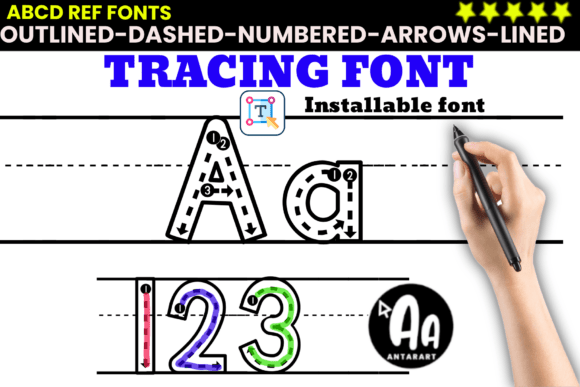
At its core, this isn't just a typeface you install. It's a teaching toolkit disguised as a font. Each character—every uppercase letter, lowercase letter, and number—is designed with a multi-layered visual guide. Think of it as a digital worksheet generator. You type a word, and what appears on screen (or print) is a character with a bold outline, a dashed line path for tracing, a numbered arrow indicating the starting point and stroke direction, and often, a baseline or midline guide. It’s the difference between handing a child a blank page and handing them a page with a clear, step-by-step map.
Real-World Applications: Beyond the Classroom Worksheet
While its primary home is in early childhood education, the utility of a font like Dashed Outlined Arrows Lined extends into surprisingly practical corners. It’s a solution for anyone who needs to create clear, instructional visual content efficiently.
For the Educator and Homeschool Parent
This is the most obvious and powerful use case. A kindergarten teacher can create a full set of personalized name tags, morning work packets, or sight word lists in minutes. The consistency is key—every child gets the same clear model. For a homeschool parent, it’s a lifesaver. Instead of searching for and printing pre-made worksheets, you can type out the exact words or letters your child is focusing on this week, creating a custom, targeted practice sheet that aligns perfectly with their learning path. It’s particularly valuable for learners with ESL needs or fine motor challenges, as the structured, predictable format reduces cognitive load and builds muscle memory.
The Digital Content Creator's Secret Weapon
Imagine you're a YouTuber or TikToker creating educational content for kids, or a course designer building a module on handwriting. Instead of filming over your shoulder or using a clunky drawing tool, you can use this font directly in your video editor or presentation software. Animate the letters appearing step-by-step, or use them as clean, on-screen guides during a live lesson. It lends a professional, polished feel to digital slides and interactive activities that generic fonts simply can't match.
Small Business and Creative Project Applications
The applications bleed into the commercial and creative space more than you’d think. A small business owner running a children's bookstore or a tutoring center could use it for branded activity sheets. A freelance graphic designer might use it to create custom educational products for sale on platforms like Etsy or Teachers Pay Teachers. Even a hobbyist scrapbooker or a parent planning a birthday party could use the font for fun, themed activity placemats or party favor tags that double as a learning activity.
How Different Users Benefit: It's All About Efficiency and Clarity
The value proposition shifts depending on who’s using it, but the core benefit remains the same: it bridges the gap between concept and creation.
- The Time-Pressed Teacher: Benefits from rapid resource creation. The font does the heavy lifting of design, ensuring every worksheet is pedagogically sound without the teacher needing a design degree.
- The Concerned Parent: Gains a tool to provide consistent, correct practice at home, reinforcing what’s learned at school in a structured way that feels manageable, not overwhelming.
- The Digital Entrepreneur: Gains a scalable asset. They can create an entire product line of printable tracing sheets or digital templates quickly, offering real value to their audience without a massive time investment per product.
- The Special Education Therapist or ESL Instructor: Finds a tool that provides the visual scaffolding needed for learners who benefit from explicit, step-by-step instruction in letter formation.
The result isn’t just a prettier page. It’s a page that actively teaches, reducing the need for constant adult direction and empowering the learner to follow the visual cues independently.
Practical Considerations Before You Dive In
Before you click "download" or "buy," a few practical thoughts can ensure you get the most out of a resource like this.
- Understand the File Type: Typically, this comes as an installable TrueType Font (.ttf) or OpenType Font (.otf). Make sure you know how to install fonts on your operating system (Windows, Mac, Chromebook) or within your specific design software (like Canva, PowerPoint, or Google Slides).
- Check the Character Set: Does it include all the numbers and punctuation you need? Some specialty fonts might have a limited set. Also, verify if it includes both uppercase and lowercase letters as described.
- Plan Your Output: Are you primarily creating printable worksheets or digital slides? For print, consider the ink usage of bold outlines. For digital use, test how the font renders on screen and if the dashed lines are clear at smaller sizes.
- Complement, Don’t Replace: This font is a fantastic scaffold for handwriting readiness and fine motor practice. It’s most effective as part of a broader toolkit that includes hands-on activities, letter formation songs, and direct instruction.
- Licensing: For personal or educational classroom use, most licenses are straightforward. If you plan to use it in commercial products for sale, double-check the license agreement to ensure you’re covered.
Ultimately, Dashed Outlined Arrows Lined is more than a novelty. It’s a practical, problem-solving tool for a very specific and important task: teaching the foundational skill of handwriting. It turns the tedious process of creating instructional materials into a simple, type-and-go task, allowing educators and creators to focus on what truly matters—the learning itself. In a world full of complex software and flashy apps, there’s something deeply satisfying about a tool that does one job exceptionally well.