Akira: Integrating a Bold Display Typeface into Your Creative Workflow
In the vast ecosystem of digital assets, choosing the right typography is a critical decision that impacts the legibility and aesthetic of a final product. While body text requires neutrality and readability over long passages, display typography serves a fundamentally different function. It is designed to arrest attention, convey a specific mood, and establish a brand identity instantly. Akira is a prime example of a decorative display font engineered specifically for these high-impact scenarios. Understanding how to integrate a specialized asset like Akira into a professional workflow requires a shift in mindset from standard typesetting to visual composition.
Understanding the Technical Foundation
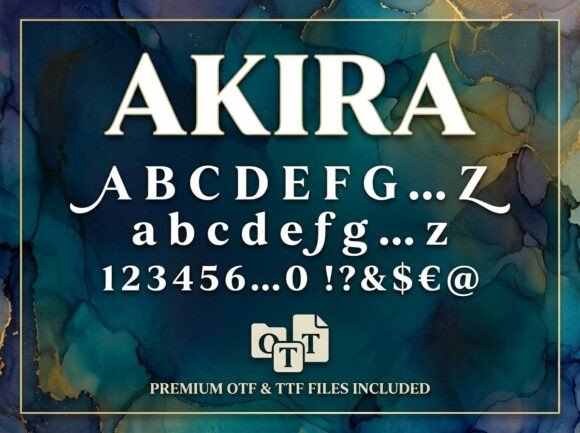
Before selecting Akira for a project, it is essential to understand the file formats provided and how they interact with standard design software. The package includes both OTF (OpenType Font) and TTF (TrueType Font) files, offering flexibility across different operating systems and applications.
The OTF file is generally the preferred choice for professional designers using advanced layout software such as Adobe Illustrator, InDesign, or Affinity Designer. OpenType technology often supports a broader range of typographic features, including ligatures and stylistic alternates, depending on the font's design. For complex vector work or print production, the OTF file ensures the highest fidelity to the designer's original intent.
Conversely, the TTF file provides universal compatibility. This is particularly useful when working across diverse environments, such as web-based design platforms (like Canva), older operating systems, or specific presentation software. When collaborating with clients or team members who may not have professional design suites, utilizing the TTF file ensures the font renders correctly on their end, preventing layout breaks or font substitution errors.
Strategic Application: Where Bold Typography Fits
Integrating a font like Akira into a project is not merely a stylistic choice; it is a strategic decision regarding hierarchy and information architecture. Because Akira is an ALL-CAPS Uppercase Only typeface, it is unsuitable for body copy or any text requiring extended reading. Its utility lies in its ability to function as a visual anchor.
Consider the role of typography in a branding workflow. When developing a visual identity, the logo and primary headers set the tone. Akira’s unique artistic elements make it a strong candidate for logos that need to convey strength, modernity, or avant-garde sensibilities. In this context, the font is not just text; it is a graphic element. The workflow here involves selecting Akira early in the concept phase to ensure that the surrounding design elements—such as spacing, color palettes, and imagery—complement its strong visual personality.
For packaging design, the font serves a functional role in shelf impact. Consumers scan products quickly; therefore, the product name or key feature must be legible at a glance. Akira’s bold construction ensures that it stands out against complex backgrounds. However, designers must account for the "ALL-CAPS" nature of the font. Since all letters are the same height, the visual rhythm differs from mixed-case text. Effective implementation requires careful kerning (letter spacing) to ensure that the uniform height does not result in a blocky, illegible appearance.
Workflow Integration and Asset Management
Efficient workflow management involves organizing assets so they are accessible and correctly categorized. Once Akira is purchased and downloaded, the font files should be installed at the system level or managed through a font management tool like FontBase or Adobe Fonts (for local activation). This prevents the common issue of "missing fonts" when opening project files months later.
A practical tip for maintaining project efficiency is to categorize Akira within your asset library as a "Display" or "Headline" font. This prevents team members from mistakenly using it for paragraphs or legal text. In a collaborative environment, such as a marketing agency or a content creation team, establishing a style guide that explicitly defines Akira’s usage—specifying minimum font sizes for legibility and pairing it with a neutral sans-serif or serif for body text—streamlines the production process and ensures brand consistency.
Design Principles: Pairing and Hierarchy
The most common pitfall when using a highly stylized font like Akira is poor pairing. Because Akira has a "strong visual personality," it competes with other design elements. If paired with another decorative font, the result is often visual chaos.
The implementation process should follow the principle of contrast. Akira pairs best with clean, geometric sans-serifs or classic serifs. For example, using Akira for a main headline creates a focal point, while using a font like Open Sans or Garamond for the sub-header and body text provides a restful reading experience. This hierarchy guides the viewer’s eye naturally from the artistic hook to the informational content.
Furthermore, because Akira is designed to be the center of attention, it requires "breathing room." Crowding a layout with too many competing graphics dilutes the font's impact. In a layout workflow, this means adjusting margins and padding around the text elements. White space is not empty space; it is an active design element that allows the unique contours of the letterforms to be appreciated.
Quality Control and Pre-Production Checks
Before finalizing a project that utilizes Akira, a specific quality control (QC) workflow is necessary. First, check for tracking and kerning issues. Display fonts often require manual adjustment, especially in larger sizes where spacing imperfections become more visible. Second, verify color contrast. While the font is bold, the specific color combination against the background must meet accessibility standards (WCAG) to ensure it is readable by users with visual impairments.
Finally, when preparing files for print, it is standard practice to outline the fonts. Converting the text to vector shapes ensures that the printer does not need to have the Akira font installed, eliminating potential rendering errors. This step is crucial for logos and packaging where the precise shape of the typography is part of the brand equity.
Conclusion: Elevating Visual Communication
Akira is more than just a set of characters; it is a tool for visual differentiation. By understanding its technical specifications—OTF for precision, TTF for compatibility—and respecting its design constraints as an uppercase-only display face, creators can leverage this asset to produce high-impact visuals. Whether used for a startup’s branding, a blogger’s featured image, or a freelancer’s portfolio header, Akira functions as a catalyst for attention. Successful implementation relies on a structured workflow that prioritizes hierarchy, contrast, and technical preparation, ensuring that the final output is not only visually striking but also professionally polished.