Ornamental Flowers: A Guide to Using This Sketch-Style Dingbats Font
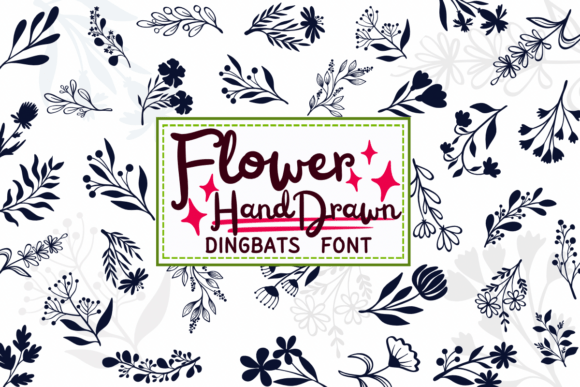
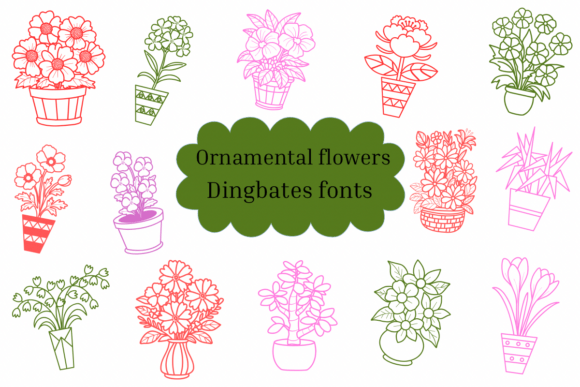
When it comes to graphic design, typography is often associated strictly with letters and numbers. However, there is a distinct category of typefaces known as dingbats, which replaces standard characters with symbols and icons. Ornamental Flowers is a prime example of this specialized font category. Unlike standard serif or sans-serif fonts used for body text, this typeface features a collection of floral illustrations rendered in a sketch style. It is a digital tool designed to bring a hand-drawn, organic aesthetic to creative projects without the need for advanced illustration skills.
For creators ranging from wedding planners to small business owners, Ornamental Flowers offers a quick way to add decorative elements to designs. The sketch style implies a certain level of informality and artistic flair, making it particularly popular for DIY projects, personalized stationery, and branding that requires a personal touch. However, because this font operates differently than standard typefaces, there are specific nuances to understand. Misunderstanding how to utilize a dingbats font can lead to frustration, wasted time, and a final product that looks amateurish rather than artistic.
Understanding the Nature of a Sketch-Style Dingbats Font
The primary appeal of Ornamental Flowers lies in its visual style. The "sketch" element suggests that the flower designs are not solid, filled shapes but rather outlines or textured strokes that mimic pencil or pen drawings. This is a critical distinction. Many users download decorative fonts expecting crisp, solid vectors suitable for large-scale printing, only to find a delicate line art style that may not reproduce well on busy backgrounds or low-resolution printers.
Furthermore, the term "dingbats" means that when you type the letter "A," you will not see the letter A; you will see a specific flower icon. This requires a shift in workflow. You are not typing words; you are selecting images via keystrokes. For professionals and marketers, this method of asset generation can be highly efficient, provided the workflow is set up correctly. However, for beginners, this mechanic can be confusing, often leading to the mistaken belief that the font file is corrupted because "letters aren't showing up."
Common Pitfalls When Using Ornamental Flowers
One of the most frequent errors users make with Ornamental Flowers involves font sizing and scalability. Because the design features a sketch style, it often relies on thin lines to create the illustration. If you apply this font at a very small size, such as 8pt or 10pt on a flyer, the intricate details of the floral sketches may merge together, creating a visual blob rather than a recognizable flower. This affects the legibility and quality of the design, particularly in print media where ink spread can further obscure fine lines.
Another overlooked detail is licensing and usage rights. While many hobbyists download fonts from various repositories, they often skip reading the license agreement. Ornamental Flowers may be free for personal use (like a birthday card for a family member) but require a commercial license if used on a product for sale (like wedding invitations sold on Etsy or a logo for a boutique). Ignoring this distinction can lead to legal issues and unexpected costs down the line.
Additionally, there is often a misunderstanding regarding file formats. Some users attempt to install an OpenType (.otf) file on older systems that only support TrueType (.ttf), or they fail to realize that certain advanced features of the font (like ligatures or stylistic alternates) are only accessible through professional design software like Adobe Illustrator or Photoshop, not basic word processors like Microsoft Word.
Practical Advice for Better Results
To get the most out of Ornamental Flowers, consider the following practical adjustments to your design process:
- Size Appropriately: Treat these floral icons as images, not text. Test the font at the size you intend to use it. If the sketch lines look too thin, try bolding the font (if the typeface family supports a bold weight) or increasing the size significantly.
- Check Your Backgrounds: Sketch-style fonts rely on negative space to define the image. Placing Ornamental Flowers on a dark, textured background might make the design disappear. Ensure there is high contrast between the icon color and the background color for maximum impact.
- Map Your Characters: Before starting a large project, open a character map (available on Windows and Mac) to see which key corresponds to which flower. Create a cheat sheet of your favorite symbols to speed up your workflow.
- Verify Licensing: Always check the "Read Me" file included in the download. If you are a freelancer designing a logo for a client, ensure you have the rights to transfer the font usage to that client, or that the font license permits commercial embedding.
Comparing Ornamental Flowers to Other Options
When evaluating Ornamental Flowers against other decorative assets, it is helpful to understand the trade-offs. A dingbats font is generally faster to use than importing individual vector files (.SVG or .EPS) for every single decorative element. You can type a border of flowers in seconds.
However, individual vector graphics offer more flexibility. With a vector file, you can change the color of a specific petal or alter the shape of a leaf. With a font like Ornamental Flowers, you are generally limited to the shape provided by the designer. You can change the overall color and size of the character, but you cannot edit the internal paths of the sketch without converting the text to outlines (shapes) first, which requires intermediate design knowledge.
Therefore, if your project requires heavy customization of the floral elements—such as changing specific colors to match a strict brand palette—a standard font might not be the best tool. However, for rapid prototyping, mood boards, or projects where a consistent, hand-drawn look is desired, Ornamental Flowers is an excellent choice.
Wedding Invitations and Stationery
The sketch style of Ornamental Flowers is particularly well-suited for rustic, boho, or garden-themed weddings. When using this font for invitations, avoid using it for the main body text. Instead, use it for border decorations or accent marks. A common mistake is pairing these intricate flowers with equally ornate script fonts. This creates visual clutter. Instead, pair the sketch flowers with a clean, simple serif or sans-serif font to let the illustrations stand out.
DIY Crafts and Decorations
For hobbyists creating stickers, scrapbooking elements, or party decorations, this font is a cost-effective solution. However, be mindful of your cutting machine settings (like Cricut or Silhouette). Because the sketch lines are not solid, the "Print and Cut" feature works better than trying to cut out the outline of the flowers, which can be too intricate for the blade to handle without tearing the paper.
Logos and Branding
Entrepreneurs often look for unique branding elements. While Ornamental Flowers can serve as a temporary placeholder or a mood-setter, relying solely on a dingbats font for a primary logo can be risky. Other businesses may use the same font, making your brand less unique. The better approach is to use the font to generate ideas, then hire a designer to create a custom illustration based on the style you liked, ensuring your brand identity is one-of-a-kind.
Final Checks Before You Start
Before you commit to Ornamental Flowers for your next big project, take a moment to audit your needs. Ask yourself if the sketch style fits the tone of your message. A sketch style implies informality and artistry; it may not be appropriate for a corporate financial report, but it is perfect for a bakery menu or a yoga studio brochure.
Ensure your software supports the font format. If you are using web-based tools like Canva, verify that the font uploads correctly and that the symbols render as expected, as some web platforms handle dingbats differently than desktop software. By taking these preparatory steps, you can avoid the frustration of mid-project technical glitches and ensure that the decorative elements enhance, rather than hinder, your creative vision. Ornamental Flowers is a versatile tool, and with the right approach, it can add a beautiful, handmade touch to any digital or print design.