Mastering the Dream Wedding Duo: Avoiding Common Pitfalls for Flawless Typography
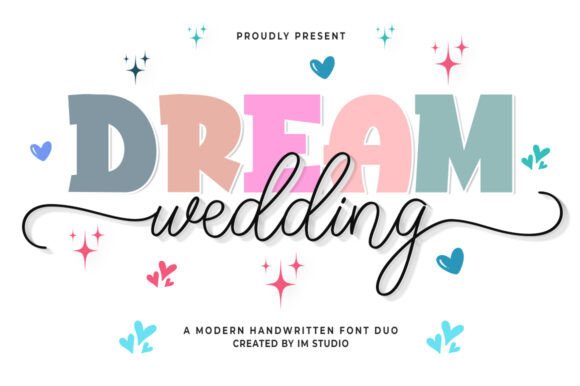
In the realm of graphic design, the difference between a project that looks "homemade" and one that appears "professionally crafted" often comes down to typography. The Dream Wedding Duo has emerged as a popular choice for creators ranging from invitation designers to social media marketers. It is a versatile duo-font system that seamlessly blends the clean, structural lines of a sans serif with the flowy, romantic elegance of a script typeface. While this combination offers a powerful tool for creating captivating headlines and tender greeting cards, many users struggle to unlock its full potential.
Whether you are a freelancer designing a wedding suite or a small business owner creating branding materials, understanding how to properly evaluate and implement this typeface is crucial. If you have ever felt that your final design looked cluttered, unprofessional, or difficult to read, the issue likely lies not in the font itself, but in how it was applied. Let us explore the common mistakes people make when using the Dream Wedding Duo and how you can avoid them to ensure your creative expressions always convey the right sense of romance and sophistication.
Understanding the Anatomy of the Font
Before downloading or purchasing, it is vital to understand exactly what a "duo-font" entails. A common mistake is assuming that Dream Wedding Duo is a single file that automatically changes style as you type. It is actually two distinct font files: one containing the clean sans serif characters and the other containing the script characters.
The magic happens when you manually pair them. The sans serif provides stability and readability, while the script adds flair and personality. When used correctly, they create a perfect merger. However, treating them as interchangeable rather than complementary is where errors begin. You must learn to switch between the two files to create the visual hierarchy necessary for a professional layout.
The Overlooked Power of PUA Encoding
One of the most significant features of the Dream Wedding Duo is that it is encoded with PUA (Private Use Areas). This is a technical detail that many beginners overlook, yet it is the key to accessing the font's most beautiful features.
Many users download the font, type out a standard message, and feel disappointed that the letters look basic. They fail to realize that the standard character set is only the foundation. Because the font is PUA encoded, it contains a wide array of alternate glyphs, swashes, and ligatures that are not accessible via a standard keyboard.
The Common Mistake: Ignoring the glyph panel. If you are using software like Adobe Illustrator, Photoshop, or even Canva (with specific workarounds), you must open the Glyphs window. By doing so, you can select specific letters to add a tail, a loop, or a flourish. If you skip this step, you are utilizing only 10% of the typeface's capability. The result is a generic look that lacks the "captivating headline" quality promised by the description.
Practical Advice on Application and Hierarchy
When working with a decorative typeface system like this, the goal is to guide the viewer's eye. A frequent error is using the script font for long paragraphs or using both fonts at the same size. This creates visual noise and makes the text nearly impossible to read.
Creating Contrast
To truly "unleash your creativity," you must use contrast. The clean lines of the sans serif component are designed for body text or subheadings, while the flowy script should be reserved for key focal points like names, dates, or the word "Love."
For example, if you are designing a wedding invitation, do not write the entire address in the script font. Instead, try this approach:
- Headline/Names: Use the Script font at a large size. Access the glyph panel to add swashes to the capital letters for a grand entrance.
- Date and Time: Use the Sans Serif font in all caps with increased letter spacing (tracking). This provides a modern, clean anchor for the design.
- Location Details: Use the Sans Serif font in sentence case for maximum legibility.
This combination ensures the invitation is not only beautiful but also functional. A common pitfall for entrepreneurs creating their own marketing materials is prioritizing style over substance; if the customer cannot read the store address because the script is too ornate, the sale is lost.
Avoiding Clashing Styles and Software Glitches
Another area where creators face friction is compatibility. The Dream Wedding Duo is designed to be versatile, tailoring itself to various backdrops, but this requires the right environment.
Software Compatibility
Before making a decision, check your design software. While the font works in standard word processors, you will struggle to access the special PUA encoded glyphs in programs like Microsoft Word or basic text editors. To get the professional look seen in the previews, you need software that supports OpenType features or Glyph panels, such as:
- Adobe Illustrator or InDesign
- Procreate (using a glyph picker app)
- Cricut Design Space (requires specific installation steps)
- Silhouette Studio
If you are a hobbyist trying to use this font in a basic program, you may find that the special characters are missing. This is not a defect in the font; it is a limitation of the software. Understanding this distinction prevents frustration and helps you choose the right tool for the job.
Evaluating the "Romance" Factor
Finally, when evaluating if Dream Wedding Duo is the right choice for your project, consider the tone of your message. This typeface imparts a sense of romance and elegance. It is perfect for wedding invitations, feminine branding, lifestyle blogs, and tender greeting cards.
However, it is generally not suitable for corporate reports, technical manuals, or aggressive sales copy. A mistake often made by marketers is using a script font to try to make a serious topic seem "friendlier." This can actually undermine credibility. Ensure that the emotional weight of the font matches the emotional weight of your content.
Conclusion
The Dream Wedding Duo is more than just a collection of letters; it is a design ecosystem that offers endless possibilities for those willing to learn its nuances. By avoiding the common mistakes of ignoring glyph panels, misusing hierarchy, and using incompatible software, you can transform your work from amateur to artisan.
Take the time to explore the PUA encoded characters, balance the script with the sans serif, and match the font to the appropriate context. When you do, you will find that this exquisite typeface not only amplifies your headlines but also adds that essential touch of love to every creation you craft. Whether you are a seasoned designer or a passionate beginner, mastering this duo is a step toward more professional, emotive, and effective design.